

Your home PC still runs Windows 10. It still turns on, still opens your email, still does the job. So you have been putting off the upgrade. Fair enough. But there is one thing worth setting up this month, and for most people it is free.
What actually happened in October 2025
Microsoft stopped supporting Windows 10 on October 14, 2025. No more free security updates after that date. The PC keeps working. The problem is the holes. When someone finds a new way into Windows 10, Microsoft no longer patches it. An unpatched PC is an easy target for scams and malware.
The part most people miss
You do not have to buy a new computer right now. Microsoft is still sending security updates to home users who ask for them. The program is Consumer Extended Security Updates, or ESU. It keeps the important patches coming through October 12, 2027. For most homes, you can switch it on for free.
How to turn it on
First, the one requirement. You need a Microsoft account, and it has to be an administrator on the PC. A child account will not work. Then pick one of three routes.
The free route:
- Sign in to Windows with your Microsoft account.
- Turn on Windows Backup so it syncs your PC settings.
- Open Settings, go to Update and Security, then Windows Update.
- Click “Enroll in Extended Security Updates” and follow the steps.
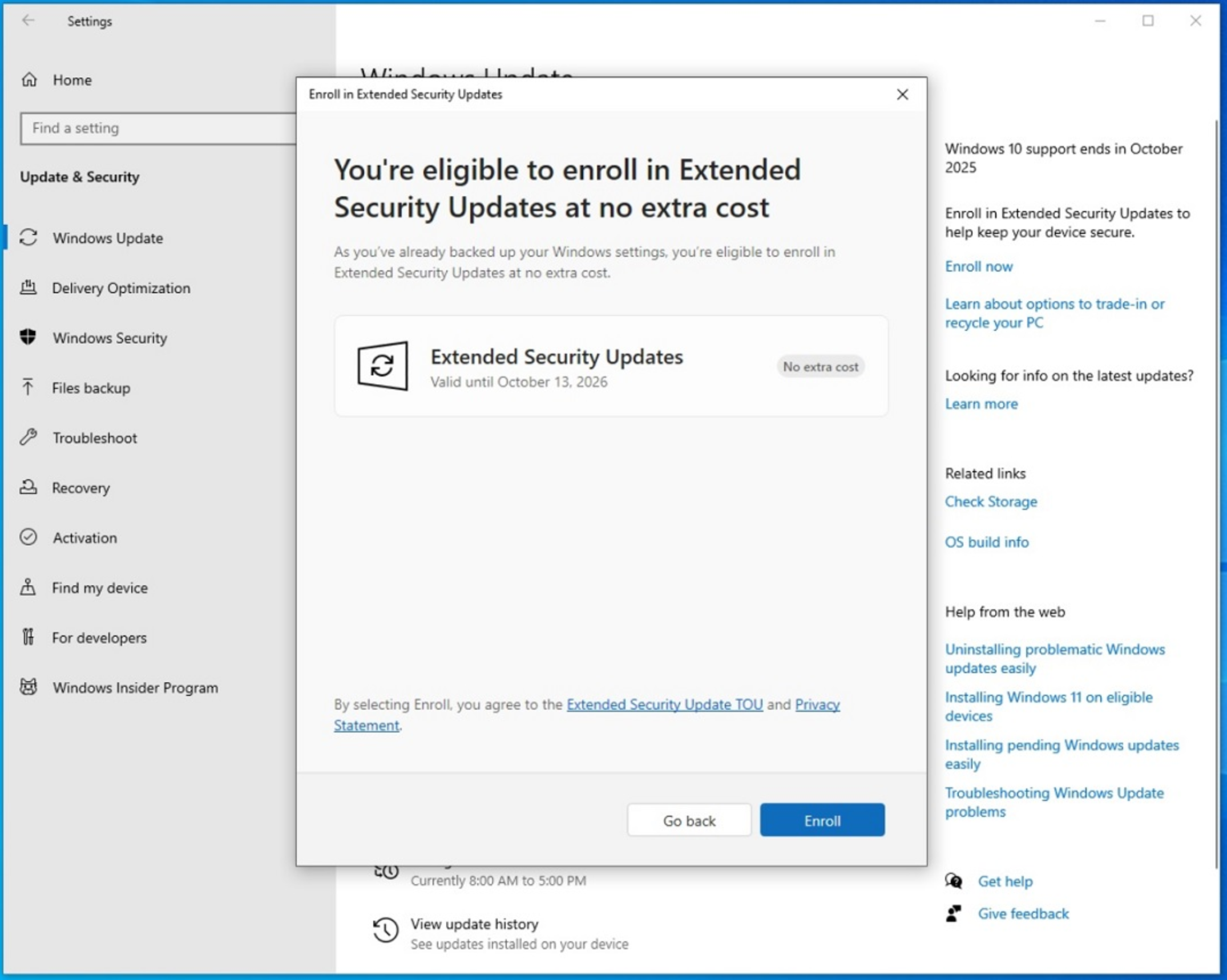
Do not want to use Windows Backup? Two other options give you the same updates. Spend 1,000 Microsoft Rewards points, or pay $30 once.
One more thing worth knowing. A single enrollment covers up to 10 devices on the same Microsoft account. So one setup can cover the whole house.
What this buys you
Breathing room. You get until October 12, 2027 to decide on your own terms. Your PC might upgrade to Windows 11 for free. It might be old enough that a new one makes more sense. Either way, you are not sitting on an unpatched machine while you think it over. That is not a permanent fix. That is a safe bridge to your next move.
One catch: work laptops are different
This is the home and personal route. It does not cover a laptop that is joined to a company domain, managed by an IT department, or locked down by a school or business. Those run on a separate, paid ESU path. If that is your machine, do not force this one. Running this on work PCs? Read the business version.
Stuck? I can help
If a step does not match what you see, or you are not sure your PC qualifies, reach out. I am based in Monmouth County, and this is exactly the kind of thing I help home users with. Email office@exine.co or book a quick call, and I will point you the right way.
Tomasz Sobolewski, Exine